
Mastering Data Fetching Strategies in Next.js
Discover the best data fetching strategies in Next.js for faster and more responsive web applications.
Andre Avindra
Introduction
If you want to maximize the performance and efficiency of your web application built with Next.js, one of the key aspects to master is data fetching strategies. In this article, we will discuss various methods and techniques for data fetching in Next.js, ranging from initial data retrieval to advanced caching strategies. With a deep understanding of data fetching, you'll be able to develop Next.js applications that are faster, responsive, and scalable. Let's get started!
Client-Side Rendering (CSR)
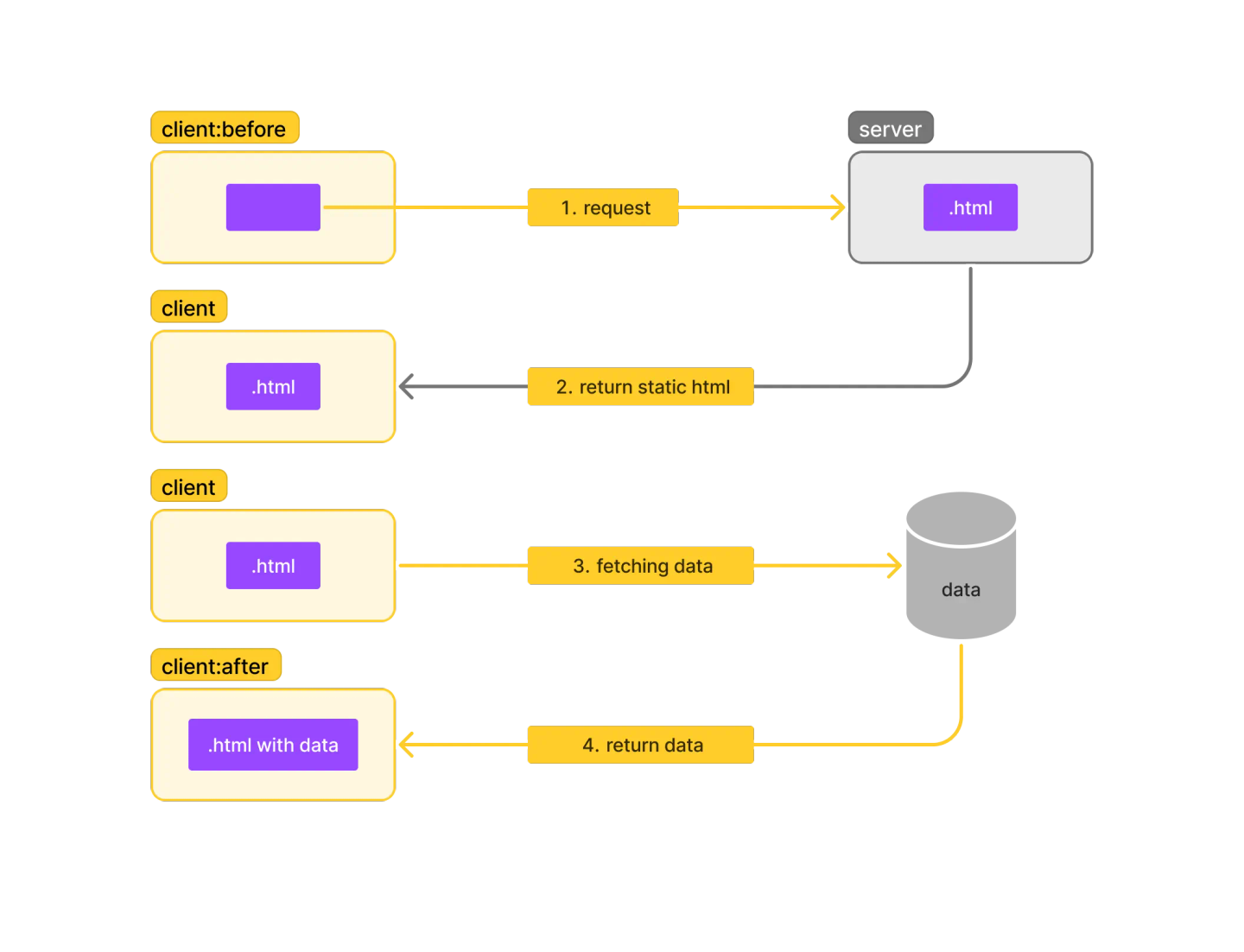
CSR is a common approach for fetching data in web applications. In CSR, data retrieval occurs after the page is initially loaded in the user's browser. This means that when a user requests a page, the browser loads the basic structure of the page first, and then JavaScript is executed to fetch and populate the data from an API or server. This dynamic process allows for a more interactive and up-to-date user experience, as data can be fetched and displayed on the page without requiring a full page refresh.
Pros:
- Doesn't burden the server with fetch and build operations.
- Users can immediately see the page, even though the data being fetched is replaced with a temporary loading view.
- Supports real-time data.
- Suitable for personalized content.
Cons:
- Users may experience a loading view before the data is fetched.
- Less favorable for SEO due to the initial empty content display (FOUC).
Example code of CSR
import * as React from "react";

export default function Blog() {
  const [blogs, setBlogs] = React.useState([]);

  React.useEffect(() => {
    getBlogs().then((res) => setBlogs(res));
  });

  return (
    <main>
      <h1>Blogs</h1>
      {blogs ? (
        <>
          {blogs.map((blog) => (
            <BlogCard key={blog.id} blog={blog} />
          ))}
        </>
      ) : (
        <Loading />
      )}
    </main>
  );
}
Build & Deploy Illustration
Serve Illustration
Server-Side Rendering (SSR)
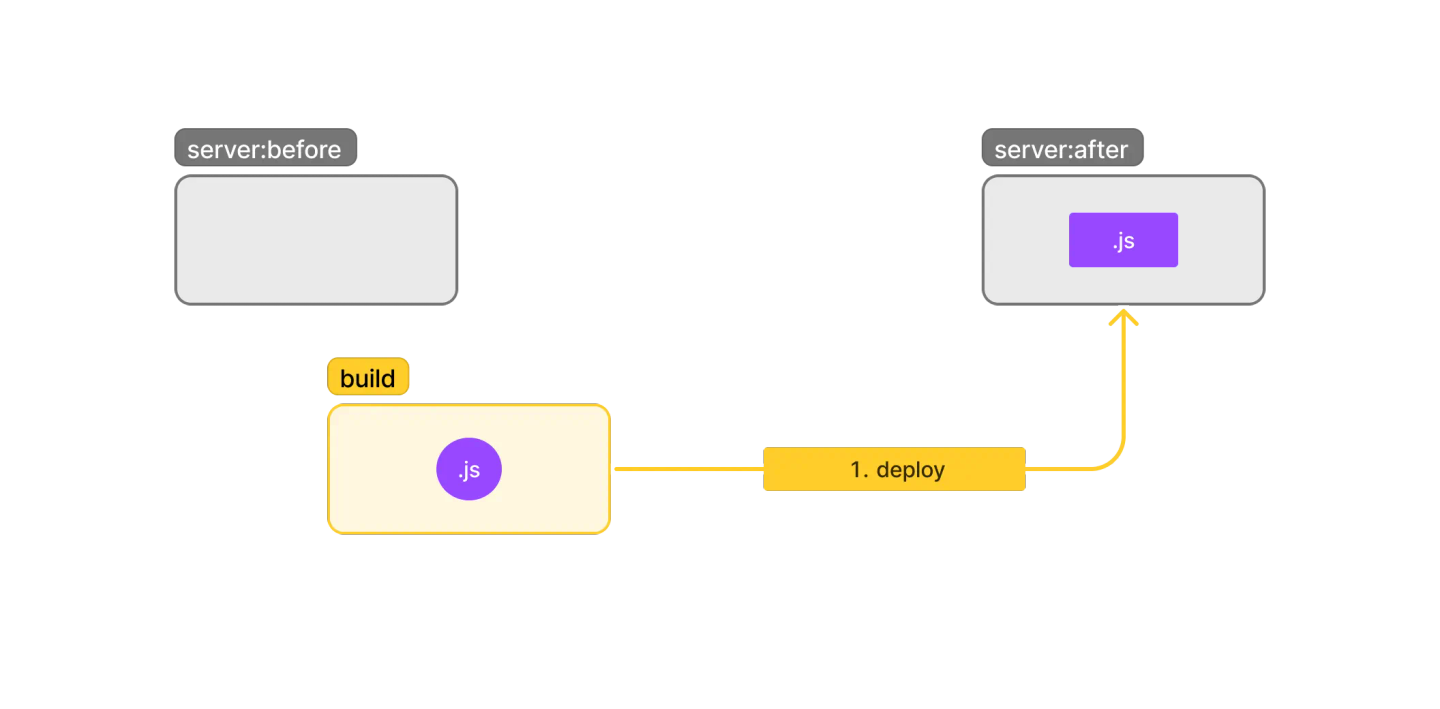
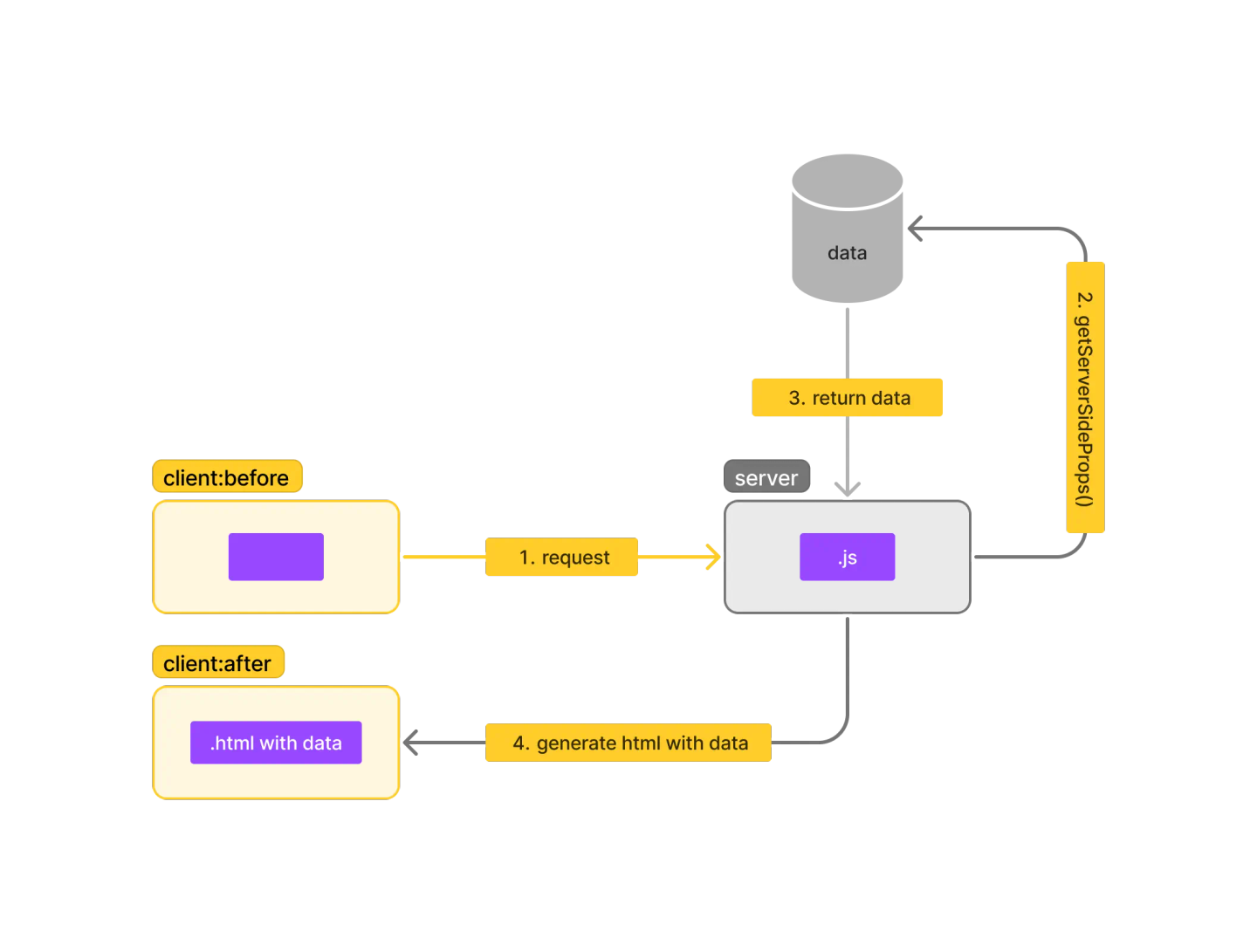
SSR is a data retrieval method where the server takes control of the web page's rendering process. Data is fetched from an API or server before the page is sent to the user's browser. This approach ensures that the initial content is fully rendered and ready when the user's browser first loads the page. SSR involves running a specific function on the server side for each page request. This function fetches the necessary data, which might introduce a slight delay, and then serves the fully populated page to the user.
Pros:
- No loading view is shown to users.
- Good for SEO.
- Supports real-time data.
- Suitable for personalized content.
Cons:
- Users must wait for fetch and build to complete before the page is displayed.
- Puts a burden on the server as each request requires fetch and build operations.
Example code of SSR
export async function getServerSideProps() {
  const blogs = await getBlogs();

  return {
    props: {
      blogs,
    },
  };
}

export default function Blog({ blogs }) {
  return (
    <main>
      <h1>Blogs</h1>
      {blogs.map((blog) => (
        <BlogCard key={blog.id} blog={blog} />
      ))}
    </main>
  );
}
Build & Deploy Illustration
Serve Illustration
Static Site Generation (SSG)
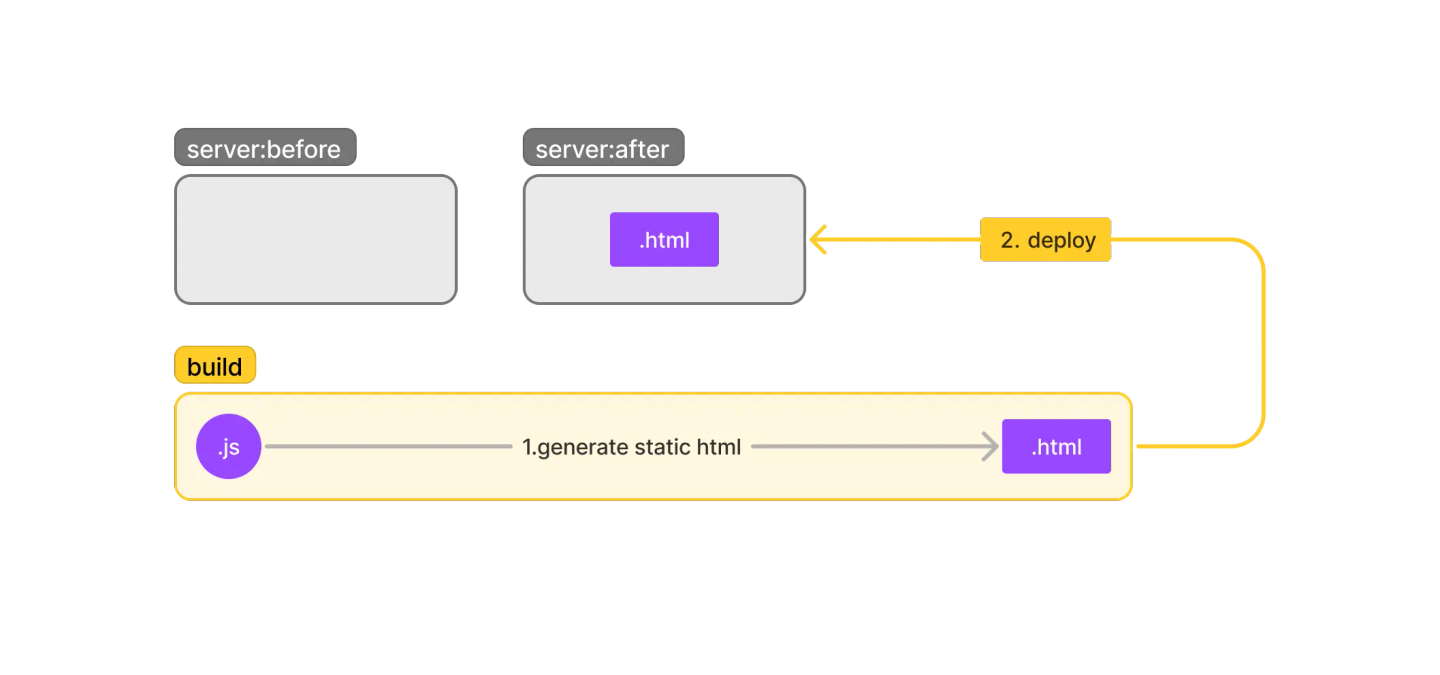
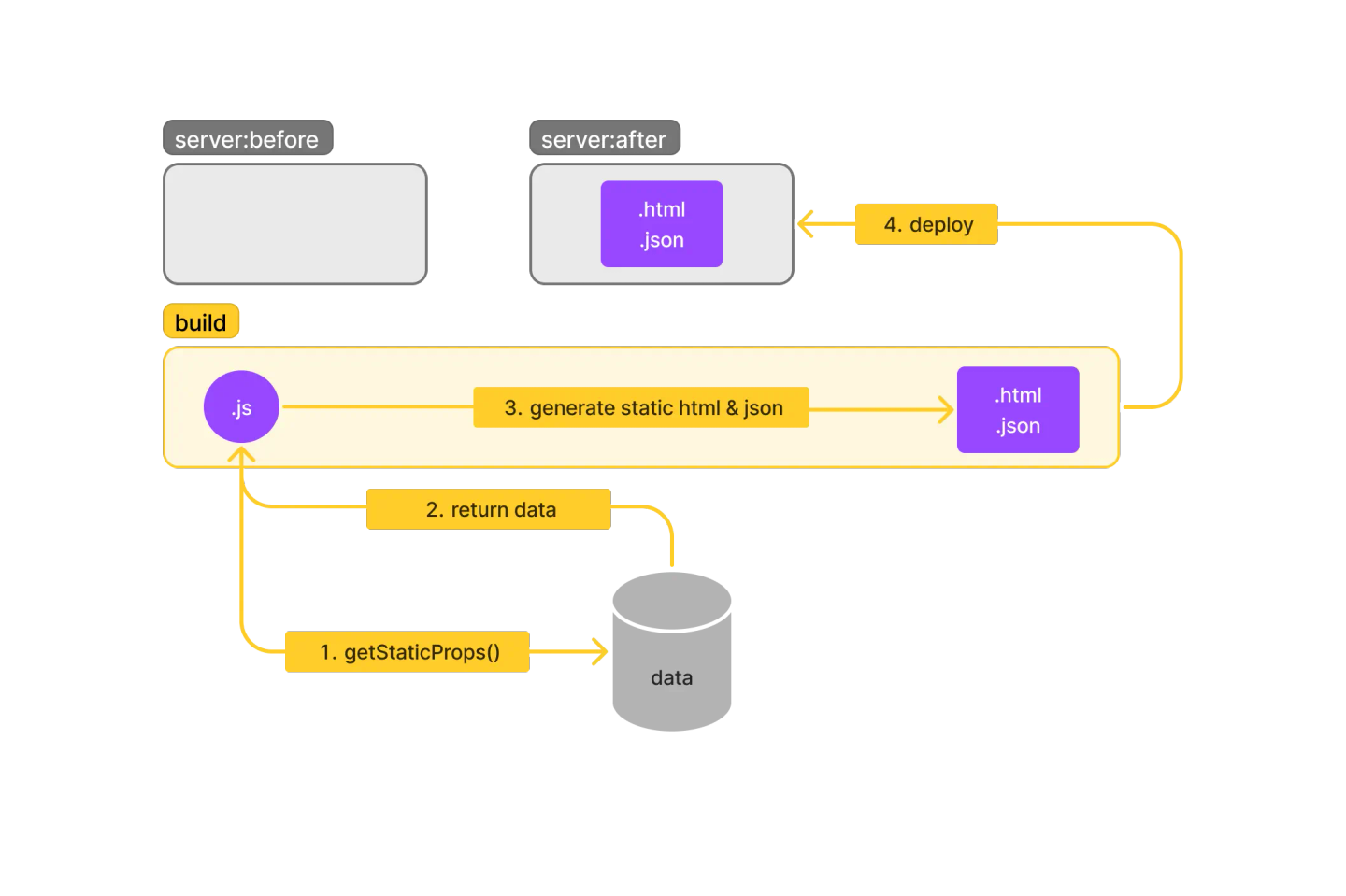
SSG is a data retrieval method that operates differently from CSR and SSR. In SSG, a unique function is executed to fetch data just once during the page-building process. Unlike CSR and SSR, where data fetching happens during or after a user's request, SSG pregenerates web pages ahead of usage time, commonly referred to as build time. During this build process, data is retrieved and incorporated into the pages, resulting in static files that already contain the necessary content. Consequently, when a user accesses a page, there's no need for server-side data retrieval, as the content is immediately available, providing a fast and efficient browsing experience.
Pros:
- Doesn't burden the server for fetch and build operations.
- Users can immediately see the web page.
- No loading view is displayed.
- Good for SEO.
Cons:
- Not suitable for fetching personalized data.
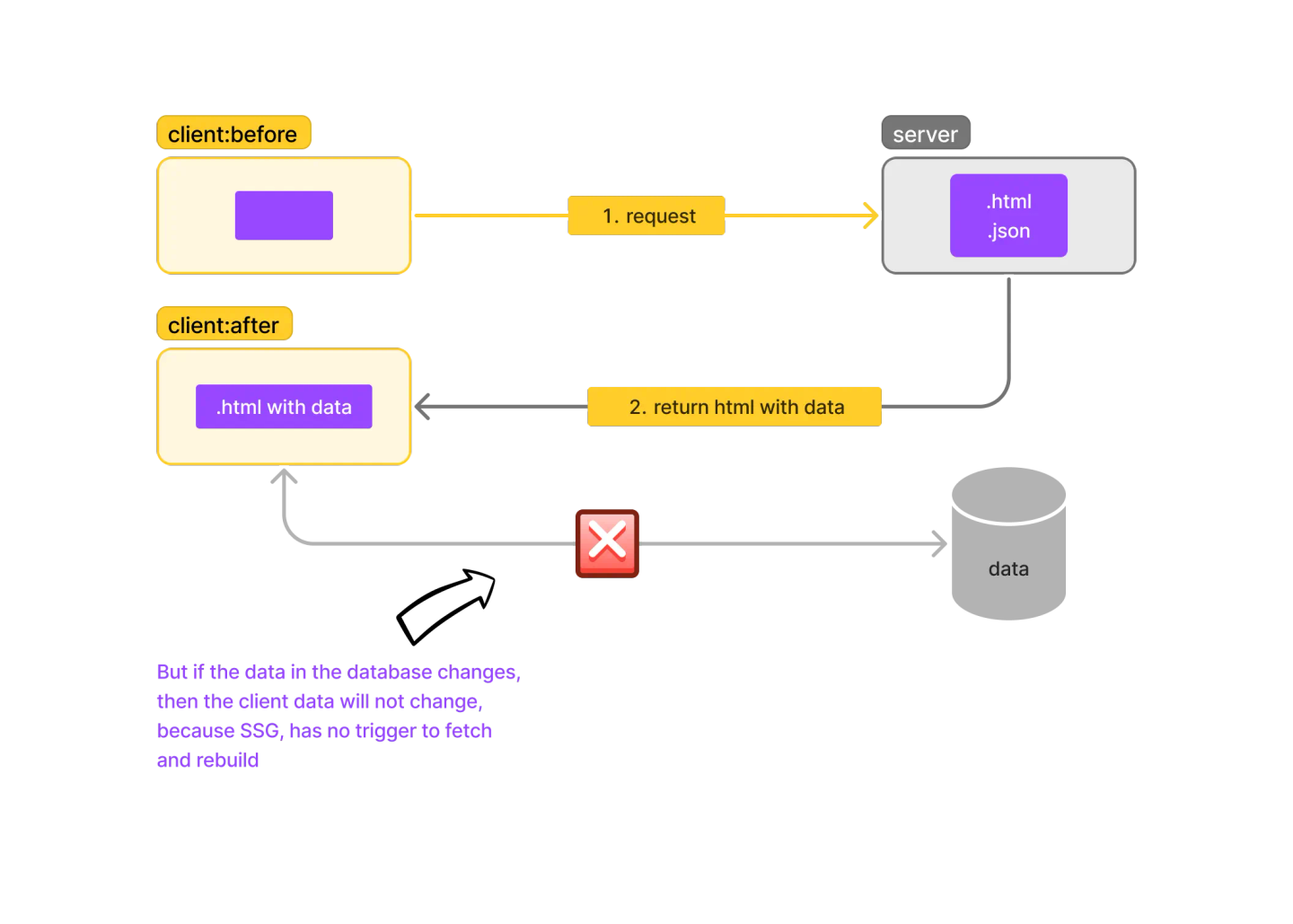
- If data in the database changes, the page won't update until a rebuild is performed.
Example code of SSG
export async function getStaticProps() {
  const blogs = await getBlogs();

  return {
    props: {
      blogs,
    },
  };
}

export default function Blog({ blogs }) {
  return (
    <main>
      <h1>Blogs</h1>
      {blogs.map((blog) => (
        <BlogCard key={blog.id} blog={blog} />
      ))}
    </main>
  );
}
Build & Deploy Illustration
Serve Illustration
Incremental Static Regeneration (ISR)
ISR represents a noteworthy advancement in web development, blending the best aspects of SSG and SSR. With ISR, web pages are initially served statically, ensuring rapid access and optimal performance. However, ISR introduces a dynamic element by allowing pages to be refreshed at specific intervals or under certain conditions. This periodic regeneration of pages enables the fetching of updated data from an API, ensuring that content remains current without the need to rebuild the entire site. ISR thus strikes a balance between the efficiency of static sites and the real-time data capabilities of server-side rendering, offering a flexible and responsive user experience.
Pros:
- Doesn't burden the server for fetch and build operations.
- Users can immediately see the web page.
- No loading view is displayed.
- Good for SEO.
- Data can be almost real-time depending on revalidation.
Cons:
- Not suitable for fetching personalized data.
- Data is not as real-time as SSR or CSR.
Example code of ISR
export async function getStaticProps() {
  const blogs = await getBlogs();

  return {
    props: {
      blogs,
    },
    revalidate: 60,
  };
}

export default function Blog({ blogs }) {
  return (
    <main>
      <h1>Blogs</h1>
      {blogs.map((blog) => (
        <BlogCard key={blog.id} blog={blog} />
      ))}
    </main>
  );
}
Build & Deploy Illustration
Serve Illustration
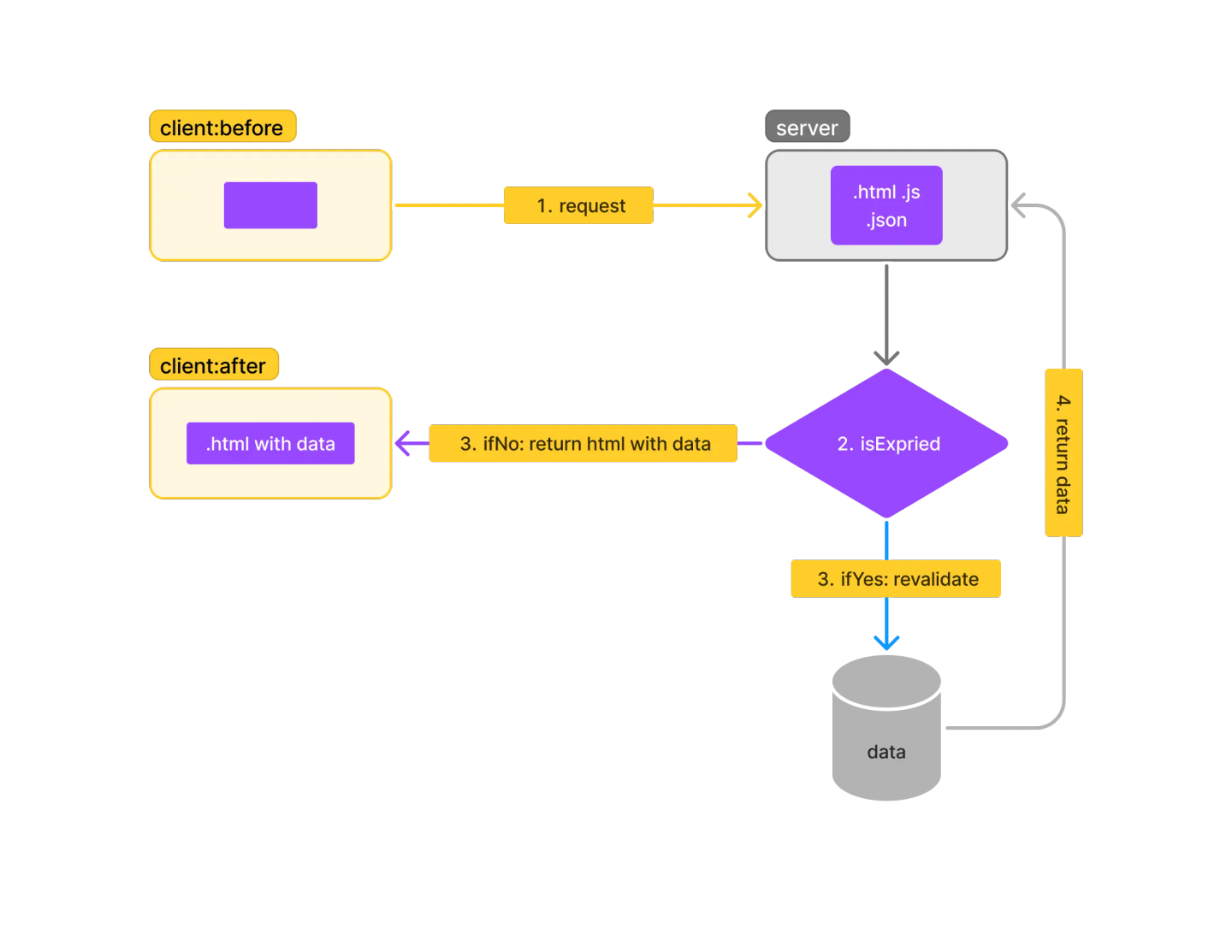
In simple terms, when there is a request from the client, the server will check whether the page has expired or not, using the value of the "revalidate" property (in seconds).
For example, if "revalidate" is set to 20 seconds:
- If the client requests and the page is still within the 20-second revalidate window, the server will immediately return the ready-to-serve HTML file.
- However, if the page has expired and there is a request from the client, the server will perform revalidation by fetching and rebuilding the page so that the data can be updated, unlike Static Site Generation (SSG). Finally, the "revalidate" value will be reset from the beginning.
Tips
To determine the appropriate data fetching strategy, here are some tips:
- Consider whether you need to read request headers. If you do, use CSR or SSR; if not, use SSG or ISR, as SSG and ISR cannot read request headers.
- If you use CSR or SSR, weigh the pros and cons of each strategy. If SEO is crucial, opt for SSR; if not, CSR can reduce server load.
- When using SSG or ISR, the critical question is how often your data changes or needs to be updated. If data needs periodic updates, use ISR as it supports revalidation; if not, use SSG.
Simple Case Example
Below are two images that provide a simple example of data fetching strategy. As an illustration, I want to create an e-commerce site to sell my own products:


Explanation Homepage
- Use CSR (Personalized Content) - When a user adds an item to the cart or updates their profile, you can refresh the cart display in real-time without having to reload the page. This process can be done with CSR.
- Use SSG (Promotion) - Assuming that promotions have a set schedule and don't change dynamically all the time, we can leverage SSG. Thus, the promotional banner is generated during build time, and the page will load quickly because it is static content. But in the case above, perhaps data fetching is also not necessary to retrieve jumbotron promotion data. Content can be poured directly statically. But the point is that SSG is very good for retrieving data that has already happened and will not change in the future.
- Use SSR (Flash sale) - Flash sale products, which are frequently viewed and have rapidly changing price or stock dynamics, are suitable for SSR. This ensures the latest data is always displayed without having to rebuild the site.
Explanation Product Detail Page
- Use ISR/SSR (Product Detail)- Use SSR if product details change frequently and you want to ensure that users always see the latest data. SSR is also good for SEO, so that the products you offer can be indexed by search engines. We can use ISR to periodically update specific pages without rebuilding the entire site.
- Use ISR (Review) - For the product review page, I believe it's best to generate the page statically but still update it periodically with new reviews using ISR. Although reviews can be fetched with CSR, I'd recommend using ISR because reviews are one of the factors that can enhance SEO.
Conclusion
Please note that the choice of data fetching strategy can vary depending on your business model and application needs. So, adjust according to the needs.
If you enjoyed this article, don't forget to leave a comment below. If you have any questions or topics you'd like to discuss, please leave your comment below.
Stay in the loop
Subscribe to new posts
Get new articles on software engineering, technology, and things I'm learning delivered straight to your inbox. No spam.